
How Does Help Desk Software Work: Simple Guide
Help desk software works by turning incoming customer or employee support requests into trackable tickets, routing those tickets to the right agent or team, and helping support staff resolve issues faster through workflows, automation, knowledge bases, and reporting. In a typical U.S.-based business, it serves as the central system for managing email, chat, phone, web forms, and self-service requests in one place.
For American companies, the practical value is straightforward: fewer missed requests, faster responses, better accountability, and a clearer view of support performance across time zones, departments, and service levels.
What help desk software does
Help desk software organizes support work so every issue has a record, an owner, and a status. Instead of handling customer emails, phone notes, and chat messages separately, the system converts them into a structured workflow.
At its core, help desk software usually does five things:
- Collects requests from channels like email, web forms, live chat, phone, SMS, or social media.
- Creates tickets with a unique ID, so each issue can be tracked from start to finish.
- Routes tickets to the right agent, team, or queue based on rules such as topic, priority, language, or customer type.
- Supports resolution with internal notes, canned responses, collaboration tools, macros, and knowledge base articles.
- Measures performance using dashboards, SLA tracking, customer satisfaction surveys, and reporting.
This matters because support teams in the U.S. often need to handle high volumes across business hours, after-hours coverage, and multiple customer segments. A help desk system reduces the chance that a request gets lost in an inbox or handled twice by different people.
The basic workflow: how a ticket moves through the system
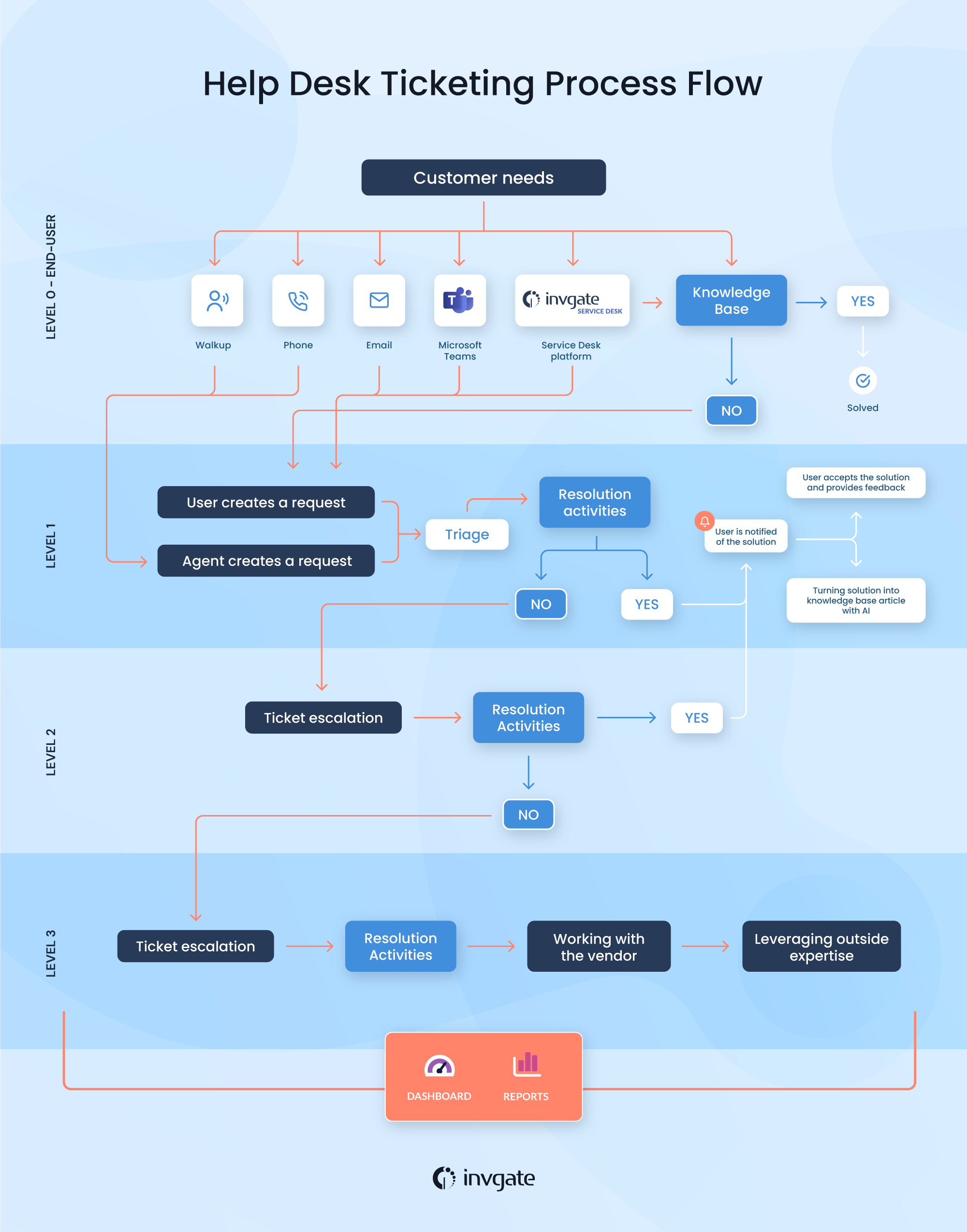
Help desk software works by moving each request through a predictable lifecycle. The exact labels vary by vendor, but most systems follow the same pattern.
1. A customer or employee submits a request
A request enters the system from a support channel. Common examples include:
- An email to support@company.com
- A web form on a company website
- A live chat conversation
- A phone call logged by an agent
- An internal employee request for IT or HR help
The software captures the message, sender details, time received, and relevant metadata. That metadata may include the customer’s account ID, product version, location, or previous ticket history.
2. The system creates a ticket
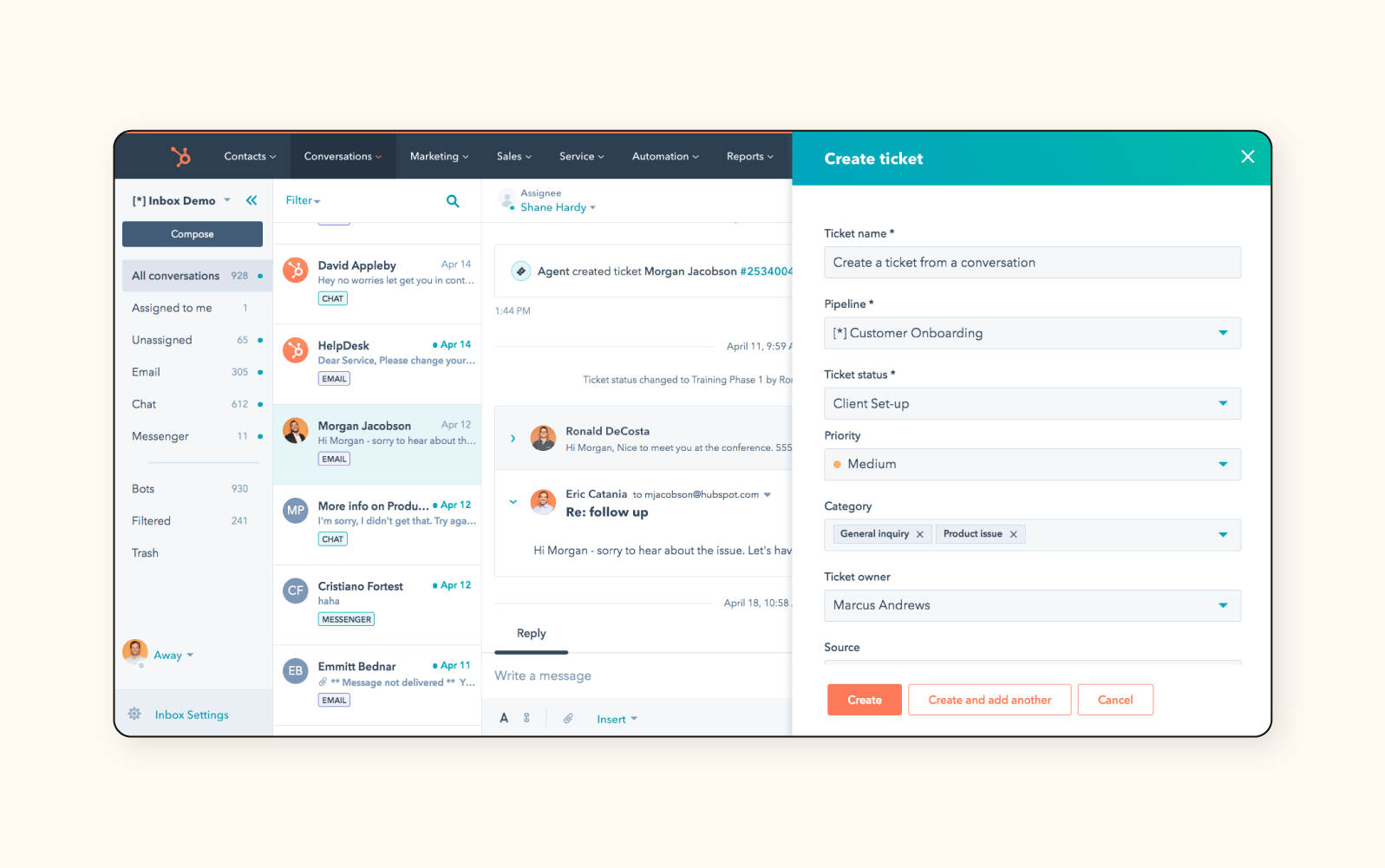
The request becomes a ticket, which is the record the team works on. A ticket typically includes:
- Ticket number
- Requester name
- Subject and description
- Status
- Priority
- Assigned agent or team
- Tags or categories
- Conversation thread
- Attachments
- Time stamps and SLA data
A ticket is useful because it gives support teams one source of truth. The customer can reference the ticket later, and the team can see everything tied to that issue.
3. Automation classifies and routes the ticket
Most help desk tools use rules to decide what happens next. For example:
- Billing questions go to the finance or customer support queue
- Password resets are routed to IT support
- VIP accounts get higher priority
- Spanish-language requests go to bilingual agents
- Urgent outages trigger escalation
This is one of the main ways help desk software saves time. Instead of manually sorting every request, the system uses criteria the team defines in advance.
4. An agent responds and collaborates
The assigned agent reviews the issue, sends a response, asks for more information, or escalates to another team. Many systems support:
- Internal notes visible only to staff
- @mentions for collaboration
- Templates for common replies
- Macros or saved actions
- Linked tickets for recurring issues
This helps teams move faster without losing context. It also reduces repeated questions because the history stays attached to the ticket.
5. The issue is resolved and closed
Once the customer’s problem is solved, the ticket is marked resolved or closed. Some systems reopen tickets if the customer replies within a set period.
After closure, the software may send:
- A satisfaction survey
- A feedback request
- A follow-up message
- A knowledge base suggestion for future self-service
That last step is important because closed tickets become data. Support leaders can review trends to find common problems, slow response areas, or training needs.
What features make the workflow possible
Help desk software works because several features connect the intake, handling, and reporting stages.
Ticket management
Ticket management is the backbone of the system. It stores each request, tracks status changes, and preserves the conversation history.
Useful ticket features include:
- Status labels such as open, pending, on hold, solved, or closed
- Priority levels
- Assignment groups
- Tags and categories
- Due dates and escalation rules
- Merge duplicate requests
Without ticket management, support work becomes hard to measure and easy to lose.
Automation rules
Automation reduces repetitive manual work. Common automations include:
- Auto-assigning tickets by topic or channel
- Sending acknowledgments instantly
- Escalating urgent issues after a time threshold
- Reminding agents about overdue tickets
- Closing inactive tickets after no response
Automation is most effective when the rules are simple and reviewed regularly. Bad automation can send tickets to the wrong queue or create confusing customer experiences.
Knowledge base and self-service
Many help desk systems include a knowledge base where organizations publish help articles, FAQs, and troubleshooting guides. Customers can often search these articles before opening a ticket.
This works well for:
- Password resets
- Account setup
- Shipping questions
- Product troubleshooting
- Policy explanations
Self-service lowers ticket volume for common issues and gives customers faster answers, especially outside U.S. business hours.
SLA tracking
Service level agreements, or SLAs, define the response or resolution time a team promises. Help desk software can track whether the team meets those targets.
For example:
- First response within 1 business hour
- Resolution within 24 business hours
- Escalation if no reply within 30 minutes for critical cases
SLA tracking is especially useful for U.S. companies that support enterprise clients, regulated industries, or internal IT operations.
Reporting and analytics
Help desk software turns support activity into reports and dashboards. Common metrics include:
- First response time
- Resolution time
- Ticket volume by channel
- Backlog size
- Reopen rate
- Customer satisfaction score
- Agent productivity and workload
These reports help managers spot staffing gaps, recurring product issues, and process bottlenecks.

How help desk software differs from a shared inbox
A shared inbox and a help desk platform can both collect support messages, but they are not the same.
| Feature | Shared inbox | Help desk software |
|---|---|---|
| Tracks requests as tickets | Usually no | Yes |
| Routes by rules | Limited | Yes |
| SLA monitoring | Rare | Common |
| Reporting | Basic | Detailed |
| Internal notes | Limited | Yes |
| Self-service knowledge base | No | Often yes |
| Automation | Limited | Strong |
A shared inbox can work for a very small team. Help desk software becomes more useful when the team needs structure, accountability, and measurable service levels.
Who uses help desk software
Help desk software is used by more than customer support teams.
Customer service teams
These teams use help desk software to manage product questions, order issues, refunds, complaints, and account help.
IT help desks
Internal IT teams use it to handle password resets, device problems, software access, onboarding, and employee technical requests.
HR and operations teams
Some organizations use help desk tools for employee questions about benefits, payroll, compliance forms, or workplace policies.
Field service or technical support teams
Teams that support equipment, installations, or complex products use help desk systems to track cases, attachments, and escalation steps.
For U.S. organizations, this flexibility matters because the same platform may support multiple departments with different workflows.
What happens behind the scenes technically
Help desk software usually connects several systems so support work stays synchronized.
Email parsing and ticket creation
When an email arrives, the software reads the message, identifies the sender, and converts it into a ticket. Replies are attached to the same thread so the history stays intact.
Routing logic
The system checks rules such as:
- Sender domain
- Keywords in the subject line
- Customer plan or account tier
- Category selected in a form
- Agent availability
- Business hours and holidays
Based on those rules, the ticket is assigned or escalated automatically.
Databases and records
The software stores ticket data, customer profiles, event history, and reports in its database. That makes it possible to search past issues, track response times, and generate trend reports.
Integrations
Many help desk tools connect to other business systems, such as:
- CRM platforms
- E-commerce platforms
- Identity management tools
- Phone systems
- Collaboration tools like Slack or Microsoft Teams
- Payment or billing systems
These integrations reduce duplicate data entry and give agents more context during support.
Example: how a ticket might move through a U.S. help desk
Here is a simple example of how help desk software works in practice.
- A customer in Texas emails support about a missing order.
- The system creates Ticket #18422 and categorizes it as “shipping.”
- A rule assigns it to the fulfillment queue.
- The customer gets an automatic acknowledgment within seconds.
- An agent checks the order status in the integrated shipping tool.
- The agent replies with an update and a resolution estimate.
- The customer confirms delivery two days later.
- The ticket is marked resolved.
- The system sends a short satisfaction survey.
- Reporting tools record the response time and resolution time.
That workflow shows the main value of help desk software: it turns an unstructured complaint into a trackable process.
Signs the software is working well
A help desk system is doing its job when you can see these results:
- Requests are not being lost
- Tickets are assigned quickly and accurately
- Response times are improving
- Customers do not have to repeat themselves often
- Managers can see backlog and workload clearly
- Common issues are being deflected by the knowledge base
- Escalations happen based on rules, not memory
- Reports show where delays occur
If those outcomes are missing, the problem may be the software setup, the workflow design, or the team’s operating habits rather than the platform itself.
Common mistakes when using help desk software
The software works best when the process around it is well designed. Common mistakes include:
- Too many ticket categories. If categories are overly detailed, agents spend time classifying instead of solving.
- Weak automation rules. Bad routing sends tickets to the wrong place.
- No knowledge base maintenance. Outdated articles can increase frustration instead of reducing tickets.
- Ignoring SLAs. If deadlines are not monitored, the system becomes a database instead of a service tool.
- Poor integration setup. If customer context is missing, agents must switch between systems manually.
- Overlooking employee training. Even good software underperforms if the team does not use it consistently.
The fix is usually to simplify the workflow first, then add automation and reporting after the basics are stable.
How to choose the right help desk setup
The best help desk setup depends on the type of support work you need to manage.
Choose a simpler setup if:
- You have a small team
- You only handle one or two support channels
- You need basic ticket tracking and shared visibility
- You do not need complex SLA rules yet
Choose a more advanced setup if:
- You support multiple departments
- You handle high ticket volume
- You need detailed reporting and escalation
- You must meet strict service targets
- You serve customers across several time zones or business units
The key question is not whether the software has many features. It is whether the workflow matches the way your team actually works.
Limitations and boundaries to keep in mind
Help desk software improves support operations, but it does not replace people or solve process problems by itself.
It cannot:
- Fix poor product quality
- Replace trained support staff
- Guarantee fast resolution if staffing is too thin
- Make unclear policies easier for customers to understand
- Correct broken internal communication automatically
It also depends on good setup. If categories, automations, and SLAs are poorly designed, the software can create more confusion instead of less.
Frequently asked questions
Is help desk software only for customer support?
No. Many U.S. companies use it for IT, HR, facilities, and internal operations as well as customer service.
Can help desk software replace email?
Not completely. It usually works with email as an intake channel, but it adds tracking, routing, and reporting on top of email.
What is the main purpose of a ticket?
A ticket gives each request a trackable record so the team can assign, solve, and measure it.
Do small businesses need help desk software?
Not always, but it becomes useful once shared inboxes and spreadsheets start causing missed requests or slow responses.
Is a knowledge base necessary?
No, but it is often one of the most effective ways to reduce repetitive tickets and give customers faster answers.
Final take
Help desk software works by turning support requests into managed tickets, routing them through defined workflows, and giving teams the tools to respond, collaborate, and measure performance. For U.S. businesses, the biggest benefit is operational control: more visibility, fewer missed issues, and a better customer or employee support experience.
If you are evaluating help desk software, start with the channels you need to support, the volume you handle, and the response times you promise. That will tell you which features matter most.
Next questions readers often ask
- How do you set up help desk software for a small team?
- What features should a help desk system have?
- What is the difference between a help desk and a service desk?
- How much does help desk software cost?
- Which help desk software is best for IT support?
One Comment